Recurring Actions
Recurring actions let you define an action that fires on a cron schedule. Acteon stores the definition and dispatches the action automatically at each scheduled occurrence. This is useful for:
- Daily digests -- send a summary email to your team every morning at 9 AM
- Periodic health checks -- ping a service endpoint every hour
- Weekly reports -- generate and deliver a weekly metrics report every Monday
- Business-hours notifications -- send alerts only during working hours on weekdays
How It Works
Unlike scheduled actions, which delay a single dispatch, recurring actions are persistent definitions that fire repeatedly on a cron schedule. They are API-only entities -- you create them via the REST API, not through rules.
sequenceDiagram
    participant C as Client
    participant A as API Server
    participant S as State Store
    participant BG as Background Processor
    participant GW as Gateway Pipeline

    C->>A: POST /v1/recurring (create)
    A->>S: Store definition + index next occurrence
    A-->>C: 201 Created (recurring_id, next_execution)

    Note over BG,S: Cron fires...
    BG->>S: Poll for due recurring actions
    S-->>BG: Recurring action is due
    BG->>S: CAS claim (60s TTL)
    BG->>BG: Build Action from template
    BG->>S: Advance schedule (compute next occurrence)
    BG->>GW: Dispatch action
    GW->>GW: Rules, dedup, providers, audit...
    Note over BG,S: Next cron tick...
    BG->>S: Poll again
Each occurrence synthesizes a concrete Action from the stored template and dispatches it through the normal gateway pipeline. All existing features -- rules, deduplication, circuit breakers, LLM guardrails, audit -- apply to every occurrence.
Concepts
Cron Expressions
Recurring actions use standard 5-field cron expressions:
 ┌───────────── minute (0-59)
 │ ┌───────────── hour (0-23)
 │ │ ┌───────────── day of month (1-31)
 │ │ │ ┌───────────── month (1-12)
 │ │ │ │ ┌───────────── day of week (0-7, MON-SUN)
 │ │ │ │ │
 * * * * *
Common patterns:
| Expression | Description |
|---|---|
*/5 * * * * | Every 5 minutes |
0 * * * * | Every hour, on the hour |
0 9 * * * | Daily at 9:00 AM |
0 9 * * MON-FRI | Weekdays at 9:00 AM |
0 9-17 * * 1-5 | Every hour during business hours (9-17, weekdays) |
0 9 * * 1 | Every Monday at 9:00 AM |
0 9 1 * * | First day of every month at 9:00 AM |
0 0 * * * | Daily at midnight |
30 4 * * SUN | Every Sunday at 4:30 AM |
0 8 1 1,4,7,10 * | Quarterly on the 1st at 8:00 AM |
Acteon uses the croner library for cron parsing, which supports standard 5-field expressions as well as extended 6-field (with seconds) and 7-field (with years) formats.
Timezone Handling
Every recurring action has a timezone field (defaults to UTC). The cron expression is evaluated in the specified IANA timezone, which means DST transitions are handled automatically.
For example, a recurring action with cron_expr: "0 9 * * *" and timezone: "US/Eastern" fires at 9:00 AM Eastern time year-round -- at 14:00 UTC during EST and 13:00 UTC during EDT.
Valid timezone values include any IANA timezone identifier: UTC, US/Eastern, US/Pacific, Europe/London, Europe/Berlin, Asia/Tokyo, Australia/Sydney, etc.
Execution Guarantees
- At-most-once per occurrence: Each cron tick is dispatched at most once, even in multi-instance deployments. A distributed CAS (compare-and-swap) claim with a 60-second TTL prevents duplicate dispatches.
- No backfill: If the server is down and misses N occurrences, only the next future occurrence is scheduled when the processor restarts. This prevents a storm of catch-up dispatches.
- Error isolation: If a dispatch fails, the recurring action remains active for the next tick. Failed occurrences are not retried.
Lifecycle
Recurring actions have three states:
| State | enabled | next_execution_at | Description |
|---|---|---|---|
| Active | true | Set | Normal operation -- will fire at the next scheduled time |
| Paused | false | null | Suspended -- will not fire until resumed |
| Completed | true | null | Finished -- the ends_at date has passed or the cron expression has no future occurrences |
Transitions:
- Active -> Paused: Call
POST /v1/recurring/{id}/pause - Paused -> Active: Call
POST /v1/recurring/{id}/resume(recomputes next occurrence from now) - Active -> Completed: Automatic when
ends_atis reached
Minimum Interval
To prevent runaway schedules, Acteon enforces a minimum interval of 60 seconds between consecutive occurrences. A cron expression that fires more frequently (e.g., every second) is rejected at creation time.
Quick Start
Create your first recurring action with curl:
# Create a daily digest email
curl -X POST http://localhost:8080/v1/recurring \
  -H "Content-Type: application/json" \
  -d '{
    "namespace": "notifications",
    "tenant": "acme",
    "cron_expr": "0 9 * * MON-FRI",
    "timezone": "US/Eastern",
    "provider": "email",
    "action_type": "send_digest",
    "payload": {
      "to": "team@example.com",
      "subject": "Daily Digest",
      "template": "morning-digest"
    },
    "description": "Weekday morning digest"
  }'
Response:
{
  "recurring_id": "019462a1-7b3e-7f00-a123-456789abcdef",
  "next_execution": "2026-02-10T14:00:00Z",
  "cron_expr": "0 9 * * MON-FRI",
  "timezone": "US/Eastern",
  "enabled": true
}
The action will fire every weekday at 9:00 AM Eastern. Each occurrence dispatches an email through the configured email provider.
API Reference
All endpoints live under /v1/recurring. Namespace and tenant are provided as query parameters.
POST /v1/recurring -- Create
Create a new recurring action definition.
Request body:
{
  "namespace": "notifications",
  "tenant": "tenant-1",
  "cron_expr": "0 9 * * MON-FRI",
  "timezone": "US/Eastern",
  "provider": "email",
  "action_type": "send_digest",
  "payload": {"to": "team@example.com", "subject": "Daily Digest"},
  "metadata": {"source": "scheduler"},
  "dedup_key": "digest-{{recurring_id}}-{{execution_time}}",
  "description": "Weekday morning digest",
  "labels": {"team": "engineering"},
  "ends_at": "2026-12-31T23:59:59Z",
  "enabled": true
}
| Field | Type | Required | Description |
|---|---|---|---|
namespace | string | Yes | Namespace for the recurring action |
tenant | string | Yes | Tenant that owns this recurring action |
cron_expr | string | Yes | Standard 5-field cron expression |
timezone | string | No | IANA timezone (default: "UTC") |
provider | string | Yes | Target provider (e.g., "email", "webhook") |
action_type | string | Yes | Action type discriminator |
payload | object | Yes | JSON payload for the provider |
metadata | object | No | Key-value metadata merged into each dispatch |
dedup_key | string | No | Dedup key template (supports {{recurring_id}}, {{execution_time}}) |
description | string | No | Human-readable description |
labels | object | No | Arbitrary key-value labels for filtering |
ends_at | string | No | RFC 3339 timestamp after which the action auto-disables |
enabled | bool | No | Whether to start active (default: true) |
Response (201):
{
  "recurring_id": "uuid-...",
  "next_execution": "2026-02-10T14:00:00Z",
  "cron_expr": "0 9 * * MON-FRI",
  "timezone": "US/Eastern",
  "enabled": true
}
Validation errors (400):
| Condition | Error message |
|---|---|
| Invalid cron expression | "invalid cron expression: ..." |
| Invalid timezone | "invalid timezone: ..." |
| Interval too short | "cron interval too short: Ns between occurrences, minimum is 60s" |
Empty provider or action_type | "provider must be non-empty" / "action_type must be non-empty" |
ends_at in the past | "ends_at must be in the future" |
GET /v1/recurring -- List
List all recurring actions for a namespace and tenant.
Query parameters:
| Parameter | Type | Required | Description |
|---|---|---|---|
namespace | string | Yes | Filter by namespace |
tenant | string | Yes | Filter by tenant |
enabled | bool | No | Filter by enabled status |
Response (200):
{
  "recurring_actions": [
    {
      "id": "uuid-...",
      "cron_expr": "0 9 * * MON-FRI",
      "timezone": "US/Eastern",
      "enabled": true,
      "description": "Weekday morning digest",
      "provider": "email",
      "action_type": "send_digest",
      "next_execution_at": "2026-02-10T14:00:00Z",
      "last_executed_at": "2026-02-07T14:00:00Z",
      "execution_count": 42,
      "created_at": "2026-01-01T00:00:00Z",
      "labels": {"team": "engineering"}
    }
  ]
}
GET /v1/recurring/{id} -- Get Detail
Retrieve the full definition of a recurring action.
Query parameters: namespace, tenant
Response (200): Full RecurringAction object including all fields.
Response (404): {"error": "recurring action not found"}
PUT /v1/recurring/{id} -- Update
Update an existing recurring action. Only provided fields are changed.
Query parameters: namespace, tenant
Request body (partial):
{
  "cron_expr": "0 8 * * MON-FRI",
  "timezone": "US/Pacific",
  "description": "Updated to 8 AM Pacific"
}
Updatable fields: cron_expr, timezone, enabled, provider, action_type, payload, metadata, dedup_key, description, labels, ends_at.
If cron_expr or timezone is changed, next_execution_at is recomputed automatically.
Response (200): Updated RecurringAction object.
DELETE /v1/recurring/{id} -- Delete
Permanently delete a recurring action and all associated state.
Query parameters: namespace, tenant
Response (204): No content.
POST /v1/recurring/{id}/pause -- Pause
Suspend a recurring action. It will not fire until resumed.
Query parameters: namespace, tenant
Response (200):
POST /v1/recurring/{id}/resume -- Resume
Resume a paused recurring action. The next occurrence is computed from the current time.
Query parameters: namespace, tenant
Response (200):
GET /v1/recurring/{id}/history -- Execution History
Note
Execution history is planned for a future release.
Cron Expression Reference
Syntax
| Field | Allowed values | Special characters |
|---|---|---|
| Minute | 0--59 | * , - / |
| Hour | 0--23 | * , - / |
| Day of month | 1--31 | * , - / |
| Month | 1--12 or JAN--DEC | * , - / |
| Day of week | 0--7 or MON--SUN (0 and 7 are Sunday) | * , - / |
Special characters
| Character | Meaning | Example |
|---|---|---|
* | Every value | * * * * * = every minute |
, | List | 0 9,17 * * * = at 9 AM and 5 PM |
- | Range | 0 9-17 * * * = every hour from 9 AM to 5 PM |
/ | Step | */15 * * * * = every 15 minutes |
Examples
| Expression | When it fires |
|---|---|
* * * * * | Every minute |
*/5 * * * * | Every 5 minutes |
0 * * * * | Every hour, on the hour |
0 9 * * * | Daily at 9:00 AM |
0 9 * * MON-FRI | Weekdays at 9:00 AM |
0 9-17 * * 1-5 | Hourly during business hours (Mon--Fri, 9 AM--5 PM) |
0 9 * * 1 | Every Monday at 9:00 AM |
0 9 1 * * | First of every month at 9:00 AM |
0 0 * * * | Daily at midnight |
30 4 * * SUN | Every Sunday at 4:30 AM |
0 0 1 1 * | January 1st at midnight (annually) |
0 */2 * * * | Every 2 hours |
0 9,12,18 * * * | At 9 AM, noon, and 6 PM daily |
Configuration
Enable recurring action processing in acteon.toml:
| Key | Type | Default | Description |
|---|---|---|---|
enable_recurring_actions | bool | false | Enable the recurring actions background processor |
recurring_check_interval_seconds | u64 | 5 | How often to poll for due recurring actions, in seconds |
Warning
If enable_recurring_actions is false, you can still create recurring actions via the API, but they will not fire. Always enable the background processor in production.
Client SDK Usage
Rust
use acteon_client::ActeonClient;

let client = ActeonClient::new("http://localhost:8080");

// Create a recurring action
let result = client.create_recurring(
    "notifications", "acme",
    "0 9 * * MON-FRI", "US/Eastern",
    "email", "send_digest",
    serde_json::json!({"to": "team@example.com"}),
).await?;
println!("Created: {} (next: {})", result.recurring_id, result.next_execution);

// List recurring actions
let list = client.list_recurring("notifications", "acme", None).await?;
for ra in &list.recurring_actions {
    println!("{}: {} ({})", ra.id, ra.cron_expr, if ra.enabled { "active" } else { "paused" });
}

// Pause
client.pause_recurring(&result.recurring_id, "notifications", "acme").await?;

// Resume
client.resume_recurring(&result.recurring_id, "notifications", "acme").await?;

// Delete
client.delete_recurring(&result.recurring_id, "notifications", "acme").await?;
Python
from acteon_client import ActeonClient

client = ActeonClient("http://localhost:8080")

# Create a recurring action
result = client.create_recurring(
    namespace="notifications",
    tenant="acme",
    cron_expr="0 9 * * MON-FRI",
    timezone="US/Eastern",
    provider="email",
    action_type="send_digest",
    payload={"to": "team@example.com"},
    description="Weekday morning digest",
)
print(f"Created: {result.recurring_id} (next: {result.next_execution})")

# List recurring actions
recurring = client.list_recurring("notifications", "acme")
for ra in recurring:
    print(f"{ra.id}: {ra.cron_expr} ({'active' if ra.enabled else 'paused'})")

# Pause / Resume / Delete
client.pause_recurring(result.recurring_id, "notifications", "acme")
client.resume_recurring(result.recurring_id, "notifications", "acme")
client.delete_recurring(result.recurring_id, "notifications", "acme")
Node.js / TypeScript
import { ActeonClient } from "acteon-client";

const client = new ActeonClient("http://localhost:8080");

// Create a recurring action
const result = await client.createRecurring({
  namespace: "notifications",
  tenant: "acme",
  cronExpr: "0 9 * * MON-FRI",
  timezone: "US/Eastern",
  provider: "email",
  actionType: "send_digest",
  payload: { to: "team@example.com" },
  description: "Weekday morning digest",
});
console.log(`Created: ${result.recurringId} (next: ${result.nextExecution})`);

// List recurring actions
const list = await client.listRecurring("notifications", "acme");
for (const ra of list.recurringActions) {
  console.log(`${ra.id}: ${ra.cronExpr} (${ra.enabled ? "active" : "paused"})`);
}

// Pause / Resume / Delete
await client.pauseRecurring(result.recurringId, "notifications", "acme");
await client.resumeRecurring(result.recurringId, "notifications", "acme");
await client.deleteRecurring(result.recurringId, "notifications", "acme");
Go
client := acteon.NewClient("http://localhost:8080")

// Create a recurring action
result, err := client.CreateRecurring(ctx, &acteon.CreateRecurringRequest{
    Namespace:  "notifications",
    Tenant:     "acme",
    CronExpr:   "0 9 * * MON-FRI",
    Timezone:   "US/Eastern",
    Provider:   "email",
    ActionType: "send_digest",
    Payload:    map[string]any{"to": "team@example.com"},
    Description: "Weekday morning digest",
})
fmt.Printf("Created: %s (next: %s)\n", result.RecurringID, result.NextExecution)

// List recurring actions
list, _ := client.ListRecurring(ctx, "notifications", "acme", nil)
for _, ra := range list.RecurringActions {
    status := "active"
    if !ra.Enabled { status = "paused" }
    fmt.Printf("%s: %s (%s)\n", ra.ID, ra.CronExpr, status)
}

// Pause / Resume / Delete
client.PauseRecurring(ctx, result.RecurringID, "notifications", "acme")
client.ResumeRecurring(ctx, result.RecurringID, "notifications", "acme")
client.DeleteRecurring(ctx, result.RecurringID, "notifications", "acme")
Java
ActeonClient client = new ActeonClient("http://localhost:8080");

// Create a recurring action
CreateRecurringResponse result = client.createRecurring(
    CreateRecurringRequest.builder()
        .namespace("notifications")
        .tenant("acme")
        .cronExpr("0 9 * * MON-FRI")
        .timezone("US/Eastern")
        .provider("email")
        .actionType("send_digest")
        .payload(Map.of("to", "team@example.com"))
        .description("Weekday morning digest")
        .build()
);
System.out.printf("Created: %s (next: %s)%n",
    result.getRecurringId(), result.getNextExecution());

// List recurring actions
ListRecurringResponse list = client.listRecurring("notifications", "acme", null);
for (RecurringActionSummary ra : list.getRecurringActions()) {
    String status = ra.isEnabled() ? "active" : "paused";
    System.out.printf("%s: %s (%s)%n", ra.getId(), ra.getCronExpr(), status);
}

// Pause / Resume / Delete
client.pauseRecurring(result.getRecurringId(), "notifications", "acme");
client.resumeRecurring(result.getRecurringId(), "notifications", "acme");
client.deleteRecurring(result.getRecurringId(), "notifications", "acme");
Admin UI
The Admin UI provides a dedicated Recurring Actions page for managing recurring actions visually.
List View
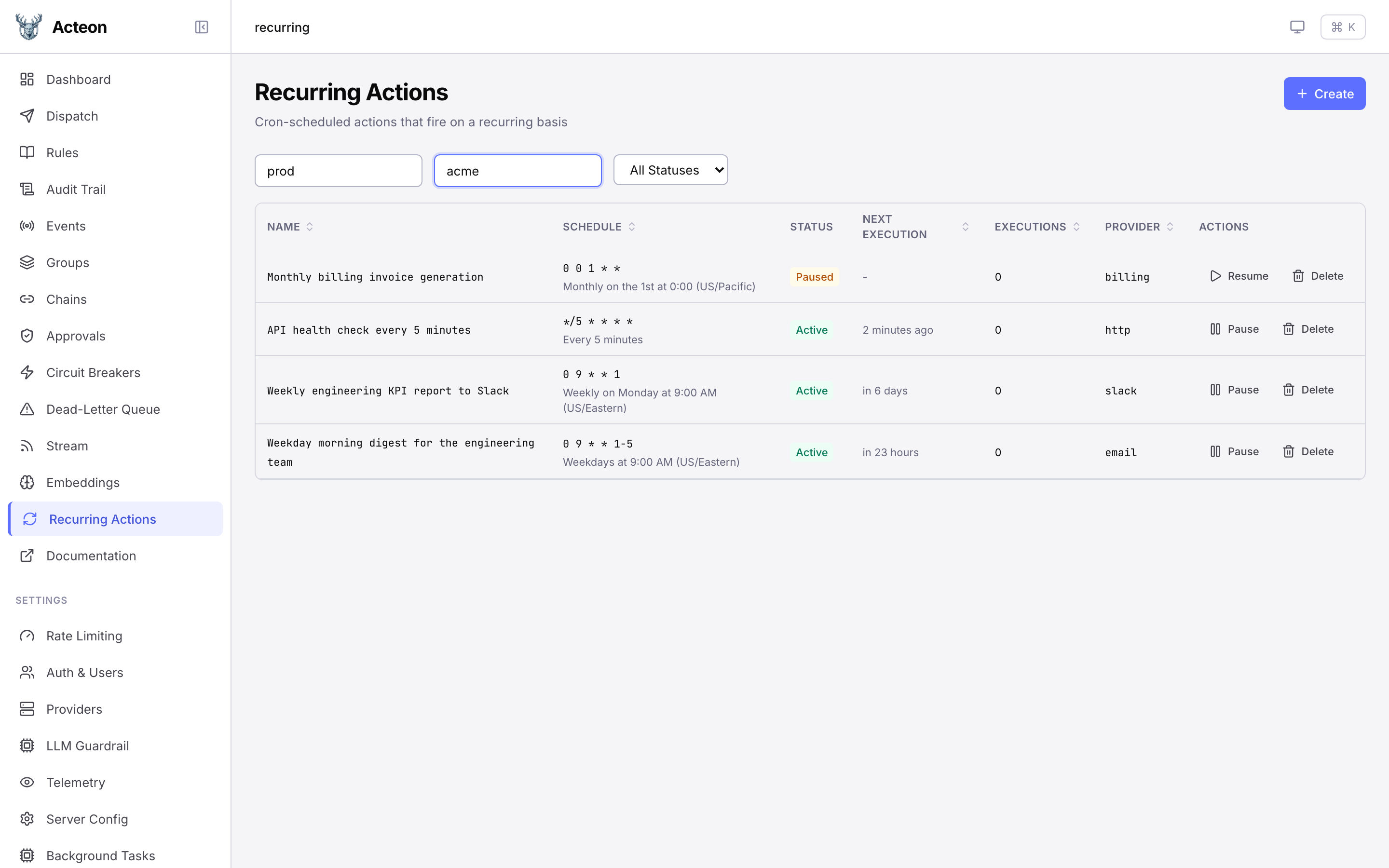
The list view displays all recurring actions with:
- Name -- the description or a truncated ID
- Schedule -- the cron expression with a human-readable description (e.g., "Weekdays at 9:00 AM") and timezone if not UTC
- Status -- Active (green), Paused (yellow), or Completed (neutral)
- Next Execution -- relative timestamp of the next scheduled run
- Executions -- total number of successful dispatches
- Provider -- the target provider name
Filter controls let you narrow results by namespace, tenant, and status (All / Active / Paused).
Each row includes Pause/Resume and Delete action buttons.
Create Dialog
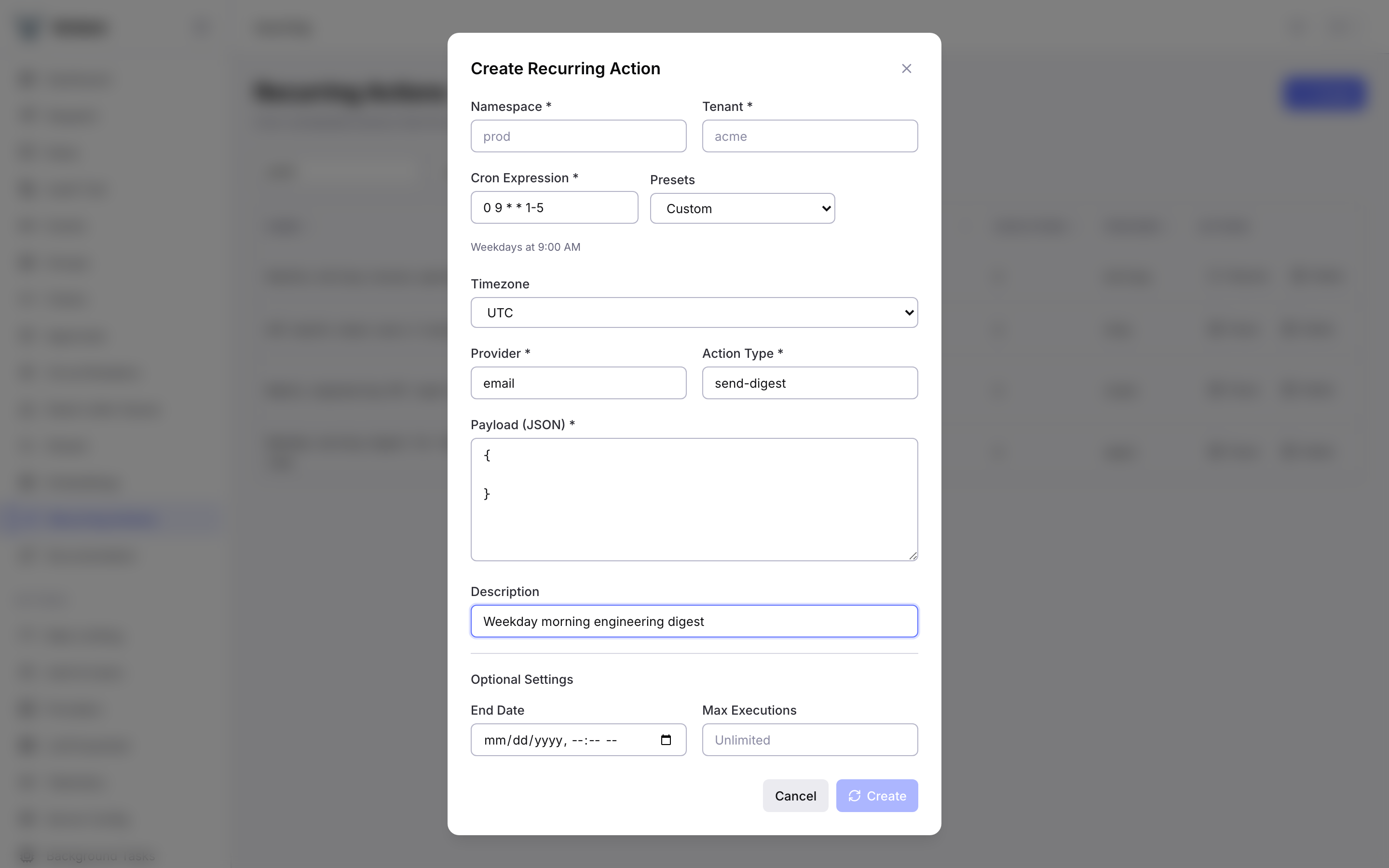
Click the Create button to open the creation form with:
- Namespace and Tenant (required)
- Cron Expression with preset dropdown (Every hour, Daily at 9 AM, Weekly, Monthly, Every 5 minutes, Weekdays, Business hours)
- Live cron description preview showing a human-readable interpretation
- Timezone selector with common IANA timezones
- Provider and Action Type (required)
- Payload editor (JSON textarea with validation)
- Description (optional)
- Optional settings: End Date (datetime picker) and Max Executions
Detail Drawer
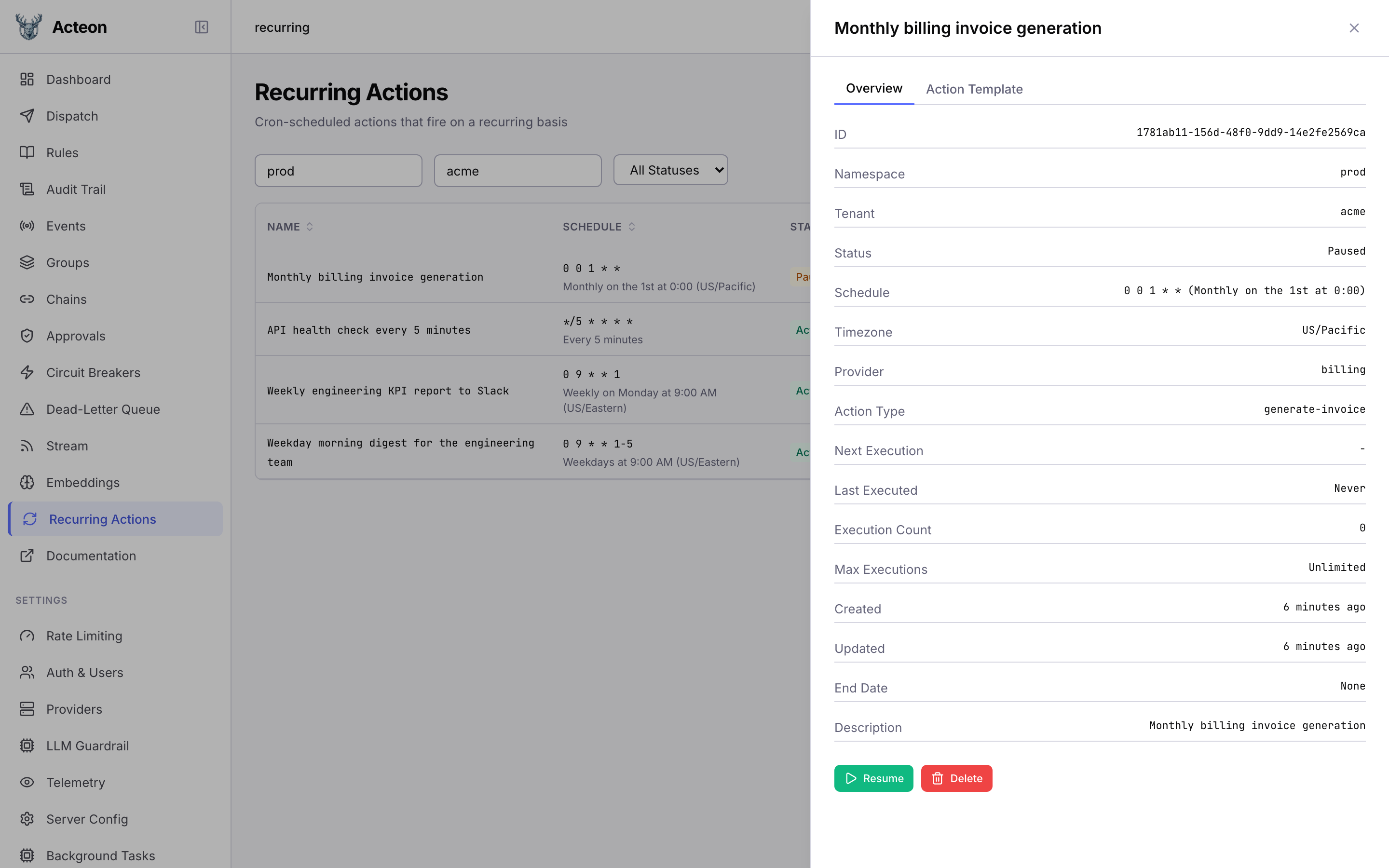
Click any row to open the detail drawer with two tabs:
- Overview -- all fields including ID, namespace, tenant, status, schedule, timezone, provider, action type, next/last execution, execution count, max executions, created/updated timestamps, end date, and description
- Action Template -- the JSON payload, metadata, and dedup key template
The drawer includes Pause/Resume and Delete buttons.
Monitoring
Prometheus Metrics
Recurring action processing exports three counters and one gauge via GET /metrics/prometheus (and as JSON at GET /metrics):
| Metric | Type | Counted on |
|---|---|---|
acteon_recurring_dispatched_total | counter | Every successful recurring occurrence dispatched through the gateway |
acteon_recurring_errors_total | counter | Dispatch failures — cron parse error, state store unavailable, claim refused for a genuine reason, etc. |
acteon_recurring_skipped_total | counter | Occurrences skipped because another replica claimed them first (normal behavior under the CAS claim pattern — not an error signal) |
acteon_recurring_active | gauge | Recurring actions currently scheduled and eligible for dispatch. Refreshed once per recurring_check_interval tick by counting the pending-recurring index. |
Grafana. The bundled acteon-overview dashboard has a "Recurring Actions" row with stat panels for active count and totals plus a rate timeseries.
What to alert on. A sustained error rate is the primary signal:
A drop in dispatch rate when recurring actions are configured often means the background processor is wedged — the claim TTL (120s) expired without progress. Compare the dispatched rate against acteon_recurring_active to spot a stuck worker without hitting GET /v1/recurring:
Do not alert on acteon_recurring_skipped_total: it fires every time a second replica loses the CAS race to claim an occurrence, which is the happy path in multi-replica deployments. Skipped > dispatched is normal if you run many replicas and few recurring actions. Use it as a capacity signal, not a health one.
Structured Logging
All recurring action operations emit structured log events via tracing:
| Event | Level | Description |
|---|---|---|
recurring.create | info | New recurring action created |
recurring.update | info | Recurring action updated |
recurring.delete | info | Recurring action deleted |
recurring.pause | info | Recurring action paused |
recurring.resume | info | Recurring action resumed |
recurring.dispatch | info | Occurrence dispatched |
recurring.skip_claimed | debug | Skipped (another instance claimed it) |
recurring.expired | warn | ends_at reached, auto-disabled |
recurring.no_next | warn | Cron has no future occurrences |
recurring.dispatch_error | error | Dispatch failed |
Best Practices
- Use descriptive names: Always set a
descriptionso recurring actions are easy to identify in the UI and logs. - Choose appropriate intervals: Match the cron interval to your actual needs. A health check every 5 minutes is usually sufficient; every minute is rarely necessary.
- Set an end date for finite jobs: If a recurring action should only run for a limited period (e.g., a promotional campaign), set
ends_atto auto-disable it. - Use labels for organization: Labels like
team,environment, orprioritymake it easier to filter and manage recurring actions at scale. - Prefer named timezones over UTC offsets: Use
US/EasternorEurope/Londoninstead of manual UTC offset calculations. This ensures correct behavior across DST transitions. - Use dedup keys for idempotency: Set a
dedup_keytemplate (e.g.,"digest-{{recurring_id}}-{{execution_time}}") to prevent duplicate dispatches if the same occurrence is processed more than once. - Monitor execution counts: A recurring action whose
execution_countstops increasing may indicate a problem with the background processor or the target provider. - Pause before updating critical fields: When changing the
cron_exprortimezoneof a production recurring action, consider pausing it first, updating, then resuming to avoid unexpected behavior during the transition.
Limitations
- Minimum interval: 60 seconds. Cron expressions that fire more frequently are rejected at creation time.
- No sub-minute scheduling: The minimum granularity for standard cron expressions is one minute.
- No backfill: If the server is down and misses occurrences, they are not replayed. Only the next future occurrence is scheduled.
- No cancellation of in-flight dispatches: Once a dispatch is triggered, it cannot be cancelled. You can pause the recurring action to prevent future occurrences.
- Polling latency: The background processor polls at the configured interval (
recurring_check_interval_seconds), so dispatches may occur up to N seconds after the scheduled time. - Eventual consistency: In multi-instance deployments, there is a brief window where different instances may see slightly different state. The CAS claim pattern ensures correctness despite this.
- Execution history: The
GET /v1/recurring/{id}/historyendpoint is planned for a future release. In the meantime, use the audit trail to track individual dispatches by filtering on the_recurring_idmetadata field.